K3s Ansible Bootstrap Proxmox — Embedded etcd, No External Dependencies
k3s ansible bootstrap proxmox: embedded etcd, no external dependencies, and 4 critical gotchas including the silent sudo failure.
This post is part of the Homelab K8s GitOps series. Start with the architecture overview or jump in anywhere.
TL;DR
- What: Four-node K3s cluster (1 bare-metal control plane + 3 Proxmox VMs) bootstrapped entirely with Ansible roles
- Why K3s over kubeadm: Single binary with embedded etcd; no separate etcd cluster to provision or manage
- Why Ansible over scripts: Idempotent runs, Vault-encrypted secrets, repeatable cluster rebuilds from a single command
- Time to complete: ~45 min
- Key gotcha: Passwordless sudo must be configured manually on the bare-metal control plane before running Ansible. Without it, Ansible silently skips all control plane plays and workers fail with
'HostVarsVars' object has no attribute 'k3s_token'— no mention of sudo anywhere in the error output. - Prereqs: Proxmox VM Provisioning with OpenTofu — workers must exist at 172.16.15.12–14 before this playbook runs
What This Post Covers
This post walks through the k3s ansible bootstrap proxmox that forms Phase 2 of the homelab GitOps stack. After OpenTofu provisions the three worker VMs, Ansible takes over: it runs common OS hardening on all nodes, installs K3s on the bare-metal control plane with embedded etcd, joins the Proxmox workers, and distributes the kubeconfig to the GitLab VM for CI use. By the end, you have a four-node cluster running K3s v1.32.5 with embedded etcd, correct node taints and labels, and etcd snapshots syncing automatically to a NAS for disaster recovery.
Why I Chose K3s and Ansible
I chose K3s over kubeadm for one concrete reason: embedded etcd. kubeadm needs a separate etcd cluster (three nodes minimum for production-grade high availability), which adds infrastructure I don’t want to manage in a single-control-plane homelab. K3s ships etcd inside the K3s binary and initializes a cluster with a single cluster-init: true flag. That’s the right tradeoff here.
I chose Ansible over bash scripts for three reasons. First, idempotency: I can re-run the playbook on a running cluster without breaking anything. Second, Vault-encrypted secrets: the K3s join token and other sensitive values stay encrypted in the repo. Third, repeatable cluster rebuilds: when I need to start over (and I have), one ansible-playbook command brings the cluster back to a known state.
Decision: K3s with embedded etcd plus Ansible roles gives a single-control-plane cluster that’s fully reproducible from a git checkout, with no external etcd cluster and no manual steps beyond the sudo prerequisite.
Architecture
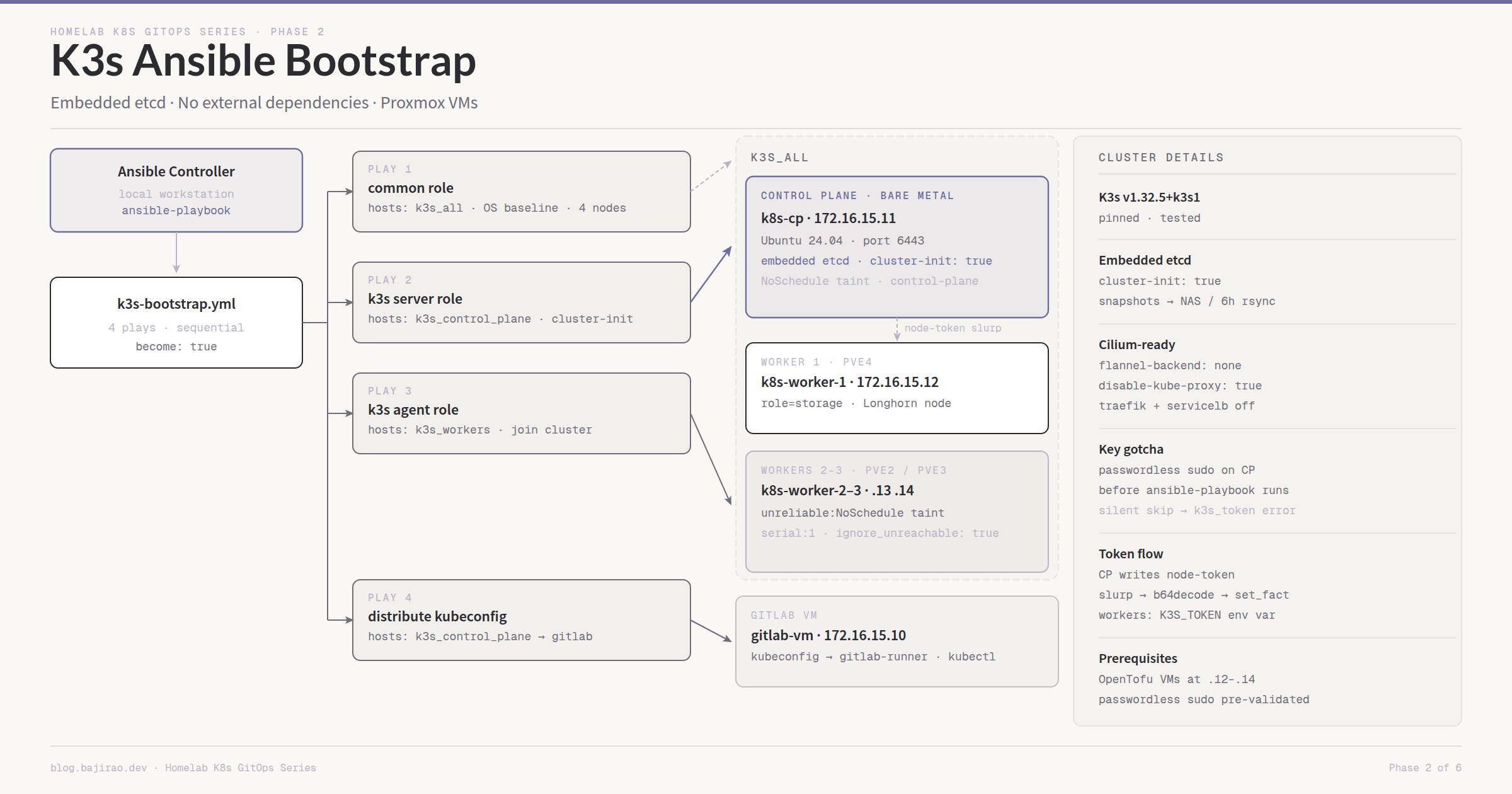
The playbook runs four plays in sequence against the hosts.ini inventory. The common OS role runs first on every K3s node. The K3s server role runs next on the control plane only, waits for the API server to be ready, then the worker play joins all three Proxmox VMs using the token read from the control plane. A final play distributes the kubeconfig to the GitLab VM so the CI shell runner can talk to the cluster.
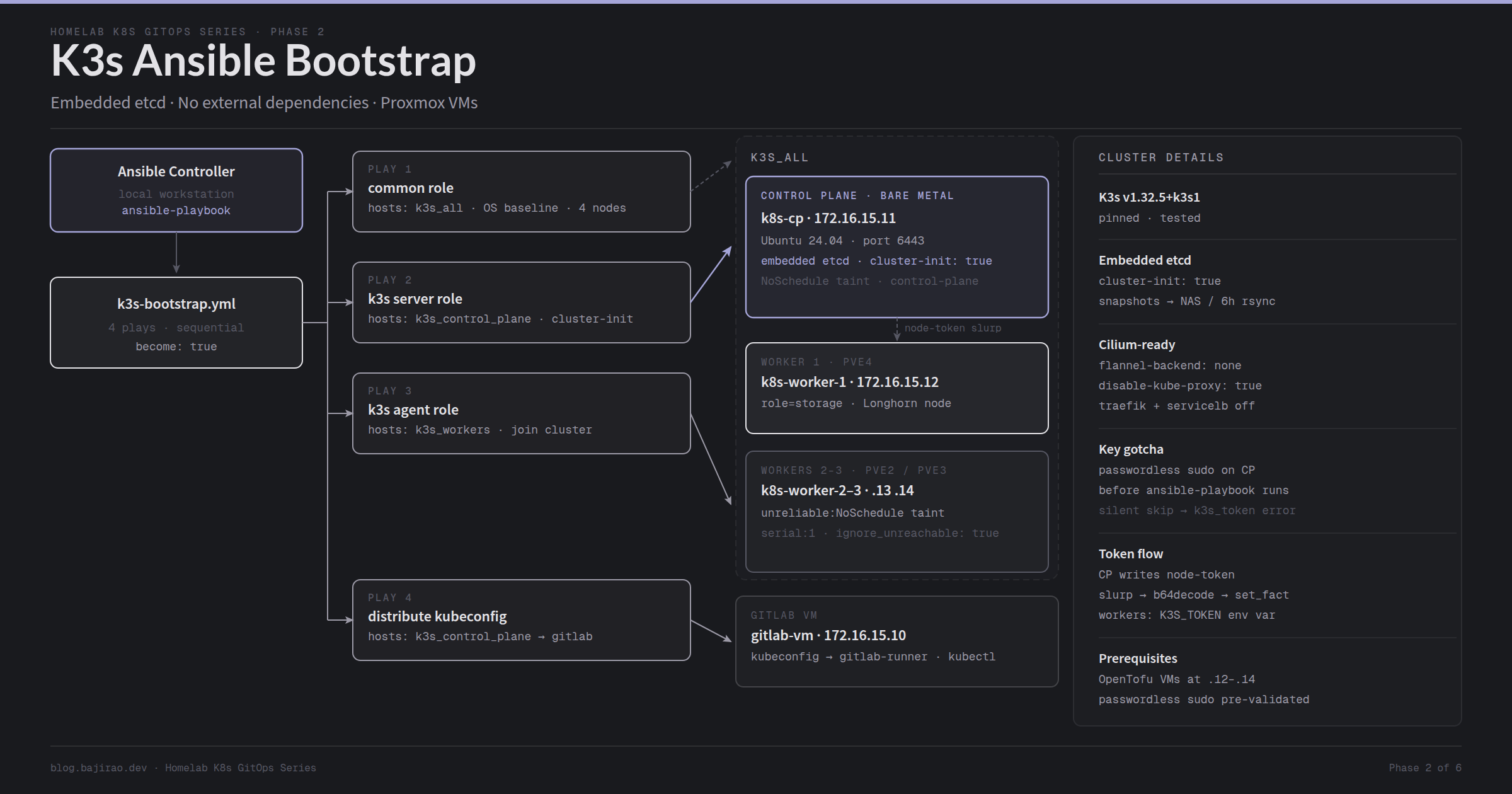
The token flow is worth noting. K3s writes a join token to /var/lib/rancher/k3s/server/node-token when the server starts. Ansible reads that file from the control plane with slurp, base64-decodes it, and sets it as a host fact before the worker play runs. Workers pull the token live from the running server rather than from Vault, which keeps the secret out of any variable file entirely.
Prerequisites
- Worker VMs provisioned at 172.16.15.12, 172.16.15.13, 172.16.15.14 (see Proxmox VM Provisioning with OpenTofu)
- Bare-metal Ubuntu 24.04 installed on
k8s-cpat 172.16.15.11, SSH accessible asubuntu - Passwordless sudo configured on 172.16.15.11 before running Ansible (see Gotcha 1 below)
- Ansible installed on your workstation:
pipx install --include-deps ansible - Required collections:
ansible-galaxy collection install community.docker ansible.posix ~/.ansible_vault_passwordwritten with your vault password, permissions set to 600
Step 1: Inventory and Group Vars
The inventory defines four groups. k3s_all is a parent group covering both the control plane and all workers so the common role runs once against the full set.
1
2
3
4
5
6
7
8
9
10
11
12
13
14
15
16
17
18
19
# hosts.ini
[gitlab]
172.16.15.10

[k3s_control_plane]
172.16.15.11

[k3s_workers]
172.16.15.12
172.16.15.13
172.16.15.14

[k3s_workers_unreliable]
172.16.15.13
172.16.15.14

[k3s_all:children]
k3s_control_plane
k3s_workers
The k3s_workers_unreliable group needs explanation. Workers 2 and 3 run on older hardware that gets powered off occasionally. Separating them into their own group lets the playbook use serial: 1 and ignore_unreachable: true on that group only. One offline worker no longer aborts the entire join play.
Group vars set the K3s version, server URL, and DNS configuration:
1
2
3
4
5
6
7
# group_vars/all/vars.yml
system_timezone: "America/Vancouver"
dns_nameserver: "172.16.0.1"
k3s_version: "v1.32.5+k3s1"
k3s_server_url: "https://172.16.15.11:6443"
internal_domain: "dev.noobhackker.com"
external_domain: "ops.noobhackker.com"
Pin k3s_version explicitly. Pulling latest during a rebuild on a different day can land on a version with a changed API or a CNI incompatibility. Check current releases at k3s-io/k3s on GitHub, pin the version you’ve tested, and change it deliberately.
Step 2: Common OS Role
The common role runs on every K3s node before anything K3s-specific touches the host. The critical tasks: disable swap (Kubernetes requires it off), install nfs-common (needed later by NFS CSI), install open-iscsi (needed later by Longhorn), and point systemd-resolved at OPNsense for DNS.
1
2
3
4
5
6
7
8
9
10
11
12
13
14
15
16
17
18
19
20
21
22
23
24
25
26
# roles/common/tasks/main.yml (relevant excerpt)
- name: Disable swap immediately
  ansible.builtin.command: swapoff -a
  changed_when: false

- name: Disable swap permanently (fstab)
  ansible.builtin.replace:
    path: /etc/fstab
    regexp: '^([^#].*\sswap\s.*)$'
    replace: '#\1'

- name: Install required packages
  ansible.builtin.apt:
    name:
      - nfs-common
      - open-iscsi
      - curl
      - ca-certificates
      - jq
    state: present

- name: Enable and start iscsid
  ansible.builtin.service:
    name: iscsid
    state: started
    enabled: true
Install open-iscsi here and never think about it again. If you skip it and install Longhorn later, Longhorn pods will enter a crash loop with no error message that points at iSCSI. The fix is obvious in hindsight, but the Longhorn UI won’t tell you what’s wrong.
Step 3: Writing the K3s Role
The K3s role handles three distinct cases: the control plane, Worker 1 (gets a role=storage label for Longhorn), and Workers 2 and 3 (get an unreliable taint so workloads avoid them by default).
Control plane config template:
1
2
3
4
5
6
7
8
9
10
11
12
13
14
15
# roles/k3s/templates/k3s-server-config.yaml.j2
write-kubeconfig-mode: "0644"
cluster-init: true
flannel-backend: none
disable-network-policy: true
disable-kube-proxy: true
disable:
  - servicelb
  - traefik
  - local-storage
node-taint:
  - "node-role.kubernetes.io/control-plane=true:NoSchedule"
tls-san:
  - 172.16.15.11
  - k8s-cp
The three disable entries and disable-kube-proxy are not optional if Cilium comes next. See Gotcha 2 for what breaks if these are missing.
Worker configs:
1
2
3
4
# roles/k3s/templates/k3s-worker1-config.yaml.j2
server: "https://172.16.15.11:6443"
node-label:
  - "role=storage"
1
2
3
4
# roles/k3s/templates/k3s-worker-unreliable-config.yaml.j2
server: "https://172.16.15.11:6443"
node-taint:
  - "node.kubernetes.io/unreliable=:NoSchedule"
Main K3s role tasks:
1
2
3
4
5
6
7
8
9
10
11
12
13
14
15
16
17
18
19
20
21
22
23
24
25
26
27
28
29
30
31
32
33
34
35
36
37
38
39
40
41
42
43
44
45
46
47
48
49
50
51
52
53
54
55
56
57
58
59
60
61
62
63
64
65
66
67
68
# roles/k3s/tasks/main.yml
- name: Create K3s config directory
  ansible.builtin.file:
    path: /etc/rancher/k3s
    state: directory
    owner: root
    mode: '0755'

- name: Write K3s config (control plane)
  ansible.builtin.template:
    src: k3s-server-config.yaml.j2
    dest: /etc/rancher/k3s/config.yaml
    owner: root
    mode: '0600'
  when: "'k3s_control_plane' in group_names"

- name: Write K3s config (Worker 1 - storage label)
  ansible.builtin.template:
    src: k3s-worker1-config.yaml.j2
    dest: /etc/rancher/k3s/config.yaml
    owner: root
    mode: '0600'
  when: "inventory_hostname == '172.16.15.12'"

- name: Write K3s config (Workers 2/3 - unreliable taint)
  ansible.builtin.template:
    src: k3s-worker-unreliable-config.yaml.j2
    dest: /etc/rancher/k3s/config.yaml
    owner: root
    mode: '0600'
  when: "'k3s_workers_unreliable' in group_names"

- name: Install K3s on control plane
  ansible.builtin.shell: |
    curl -sfL https://get.k3s.io | INSTALL_K3S_VERSION="" sh -s - server
  args:
    creates: /usr/local/bin/k3s
  when: "'k3s_control_plane' in group_names"

- name: Wait for K3s API server to be ready
  ansible.builtin.wait_for:
    port: 6443
    host: 172.16.15.11
    delay: 10
    timeout: 120
  when: "'k3s_control_plane' in group_names"

- name: Fetch K3s join token from control plane
  ansible.builtin.slurp:
    src: /var/lib/rancher/k3s/server/node-token
  register: k3s_token_raw
  delegate_to: 172.16.15.11
  run_once: true

- name: Set K3s token fact
  ansible.builtin.set_fact:
    k3s_token: ""
  when: "'k3s_workers' in group_names"

- name: Install K3s on worker nodes
  ansible.builtin.shell: |
    curl -sfL https://get.k3s.io | \
      INSTALL_K3S_VERSION="" \
      K3S_TOKEN="" \
      sh -s - agent
  args:
    creates: /usr/local/bin/k3s
  when: "'k3s_workers' in group_names"
The delegate_to: 172.16.15.11 on the slurp task is worth understanding. When this task runs inside the worker play, Ansible executes it on the control plane regardless of which worker host the current iteration is targeting. run_once: true ensures the slurp happens once, not once per worker.
Step 4: Bootstrap Playbook and Execution
1
2
3
4
5
6
7
8
9
10
11
12
13
14
15
16
17
18
19
20
21
22
23
24
25
26
27
28
29
30
31
32
33
34
# playbooks/k3s-bootstrap.yml
---
- name: Common OS configuration - all K3s nodes
  hosts: k3s_all
  become: true
  roles:
    - role: common

- name: Bootstrap K3s control plane
  hosts: k3s_control_plane
  become: true
  tasks:
    - import_tasks: ../roles/k3s/tasks/main.yml
    - import_tasks: ../roles/k3s/tasks/cilium.yml

- name: Join K3s workers
  hosts: k3s_workers
  become: true
  tasks:
    - import_tasks: ../roles/k3s/tasks/main.yml

- name: Join unreliable K3s workers
  hosts: k3s_workers_unreliable
  become: true
  serial: 1
  ignore_unreachable: true
  tasks:
    - import_tasks: ../roles/k3s/tasks/main.yml

- name: Distribute kubeconfig
  hosts: k3s_control_plane
  become: true
  tasks:
    - import_tasks: ../roles/k3s/tasks/distribute-kubeconfig.yml
Run from the ansible/ directory:
1
2
# Run from ansible/ directory
ansible-playbook playbooks/k3s-bootstrap.yml
Verify the cluster from the GitLab VM:
1
2
3
# SSH to GitLab VM, then verify cluster state
ssh ubuntu@172.16.15.10
sudo -u gitlab-runner kubectl get nodes -o wide
Expected output:
1
2
3
4
5
NAME           STATUS   ROLES                  AGE   VERSION        INTERNAL-IP
k8s-cp         Ready    control-plane,master   5m    v1.32.5+k3s1   172.16.15.11
k8s-worker-1   Ready    <none>                 3m    v1.32.5+k3s1   172.16.15.12
k8s-worker-2   Ready    <none>                 2m    v1.32.5+k3s1   172.16.15.13
k8s-worker-3   Ready    <none>                 2m    v1.32.5+k3s1   172.16.15.14
Verify the taints and labels applied correctly:
1
2
3
4
5
6
7
8
# Verify storage label on Worker 1
kubectl describe node k8s-worker-1 | grep "role=storage"

# Verify unreliable taint on Workers 2 and 3
kubectl describe node k8s-worker-2 | grep "unreliable"

# Verify control plane NoSchedule taint
kubectl describe node k8s-cp | grep "control-plane"
Gotchas and Lessons Learned
Passwordless sudo on the bare-metal control plane is not optional and the error won’t tell you it’s missing. Worker VMs get passwordless sudo injected by cloud-init when OpenTofu provisions them. The bare-metal control plane was set up manually and does not go through cloud-init. Without configuring sudo first, Ansible hits Gathering Facts on 172.16.15.11, gets “Missing sudo password”, and silently skips every task on that host. K3s never installs on the control plane. When the worker play runs and tries to read the join token, you get:
1
fatal: [172.16.15.12]: FAILED! => {"msg": "'HostVarsVars' object has no attribute 'k3s_token'"}
Nothing in that error mentions sudo or the control plane. Configure passwordless sudo before running the playbook:
1
2
3
4
5
6
7
8
# Run on the bare-metal control plane before Ansible
ssh ubuntu@172.16.15.11
sudo bash -c 'echo "ubuntu ALL=(ALL) NOPASSWD:ALL" \
  > /etc/sudoers.d/90-ubuntu-nopasswd && \
  chmod 440 /etc/sudoers.d/90-ubuntu-nopasswd'

# Verify: should return 'root' with no password prompt
sudo whoami
Disable traefik, servicelb, and kube-proxy at K3s install time. These three flags cannot be added post-install without uninstalling K3s with k3s-uninstall.sh and starting over. traefik conflicts with Cilium Gateway API because two ingress controllers compete for the same ports. servicelb conflicts with Cilium LB IPAM because both try to manage LoadBalancer IP assignment. disable-kube-proxy is required for Cilium’s eBPF kube-proxy replacement to function at all. All three belong in the control plane’s config.yaml before the K3s install script runs. The control plane template shown in Step 3 already includes them.
K3s does not back up embedded etcd to remote storage automatically. Setting etcd-snapshot-schedule-cron makes K3s write snapshots to /var/lib/rancher/k3s/server/db/snapshots/ on a schedule, but they stay local to the control plane. For real disaster recovery, those snapshots need to leave the machine. The distribute-kubeconfig task sets up a cronjob on the control plane that rsyncs the snapshot directory to the OMV NAS every six hours:
1
2
3
4
5
6
7
8
9
10
11
12
13
14
15
16
17
18
19
20
# roles/k3s/tasks/distribute-kubeconfig.yml (excerpt)
- name: Configure etcd snapshot schedule
  ansible.builtin.lineinfile:
    path: /etc/rancher/k3s/config.yaml
    line: "etcd-snapshot-schedule-cron: '0 */6 * * *'"
  delegate_to: 172.16.15.11
  notify: Restart K3s

- name: Set up etcd snapshot rsync cron to NAS
  ansible.builtin.cron:
    name: "Rsync etcd snapshots to NAS"
    minute: "30"
    hour: "*/6"
    job: >
      rsync -avz -e "ssh -o StrictHostKeyChecking=no"
      /var/lib/rancher/k3s/server/db/snapshots/
      ubuntu@172.16.0.10:/k8s-backups/etcd/
      >> /var/log/etcd-backup.log 2>&1
    user: root
  delegate_to: 172.16.15.11
The 30 minute offset staggers the rsync after the snapshot write completes. The SSH key from the control plane root user must be authorized on the NAS before this cron fires, which the preceding authorized_key task in distribute-kubeconfig.yml handles.
Use serial: 1 and ignore_unreachable: true on the unreliable worker group. Without serial: 1, an unreachable host causes Ansible to abort the entire play, leaving reachable workers unjoined. Without ignore_unreachable: true, a connection failure marks the task as failed rather than skipped. Together, these settings let the play complete successfully for the online workers and skip gracefully for the offline ones. The skipped hosts join the cluster the next time the playbook runs and they’re powered on. Apply this only to k3s_workers_unreliable, not to all workers; running serial: 1 on the full worker group when all three are reliably online just slows down the join play for no reason.
Conclusion
The cluster is running with embedded etcd, correctly tainted and labeled nodes, and etcd snapshots leaving the control plane automatically. Every element of the cluster state is reproducible from the playbook alone. Cilium still needs to come up before workloads can schedule, but the cluster foundation is solid and the kubeconfig is in the GitLab VM, ready for the next phase.
What’s Next
Next up: Cilium CNI with kube-proxy replacement — installing Cilium as the cluster CNI with full eBPF kube-proxy replacement and Gateway API GatewayClass support.